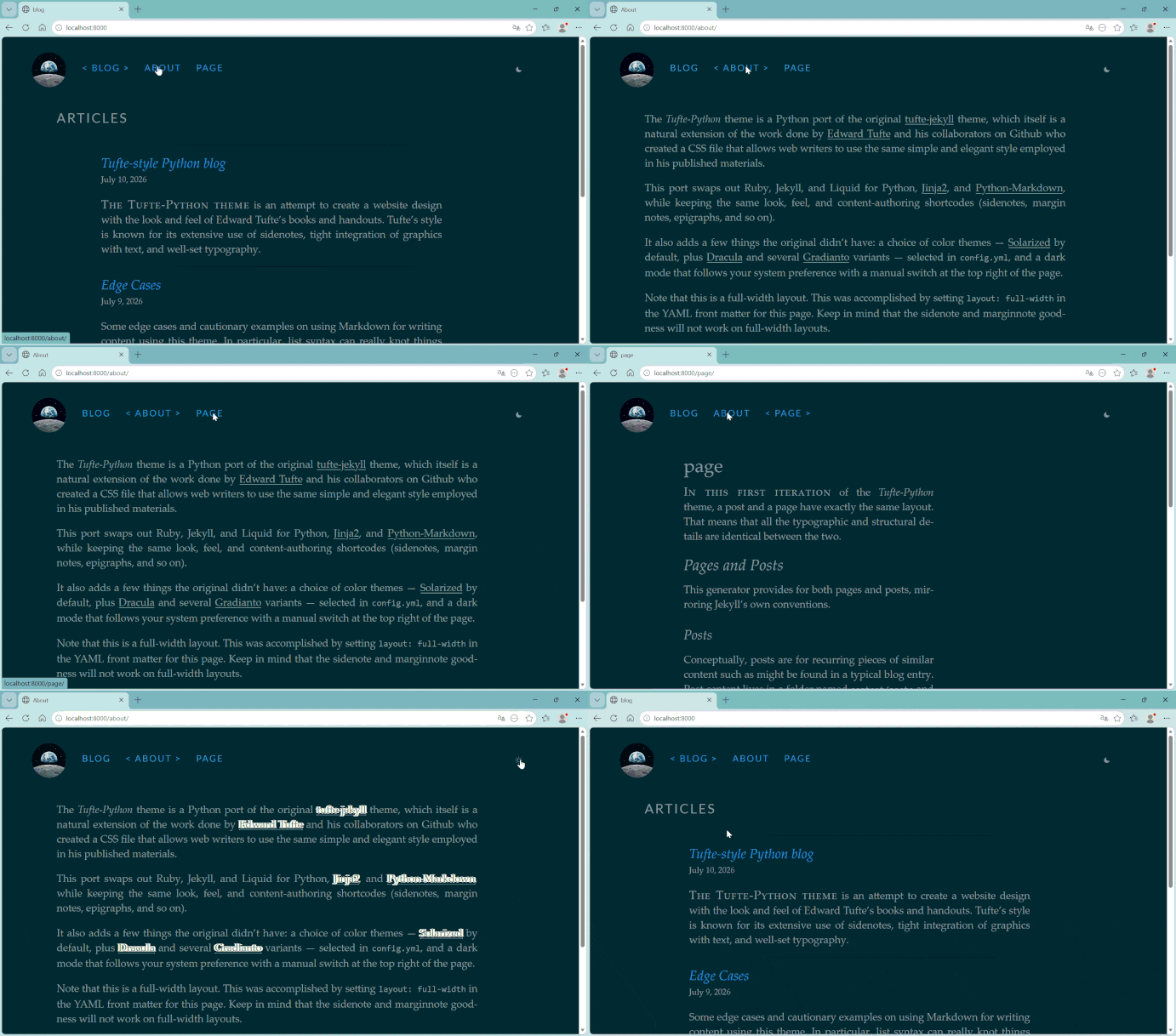
几年来,我一直关注着一个采用 tufte-jekyll 风格的博客,也正是它让我发现了 Edward Tufte 的书籍版式设计。
Edward Tufte 在数据可视化与信息设计领域享有盛名,他坚定主张提高数据密度,并坚决剔除“图表垃圾”(chartjunk)。
这正是 tufte-css(以及它的众多移植版本,包括本文这一版)带给 Web 的东西:宽绰的留白、衬线字体的阅读栏,还有珍贵的边注(sidenotes)——用它来承载补充信息,而不是用打断阅读的弹窗。
tufe-jekyll 博客的方方面面我几乎都喜欢,唯独与写作无关的部分例外:它由 Jekyll 驱动、基于 Ruby,而我接触 Ruby,纯粹只是为了这一个项目。
于是我用 Python 把整套主题重写了一遍。倒不是 Jekyll 不好——它并不差——只是我想要一套自己用着顺手的工具链。另外我也好奇:我是否真的理解了一个静态网站生成器的运作原理,并能把这套思路消化吸收、为我所用。
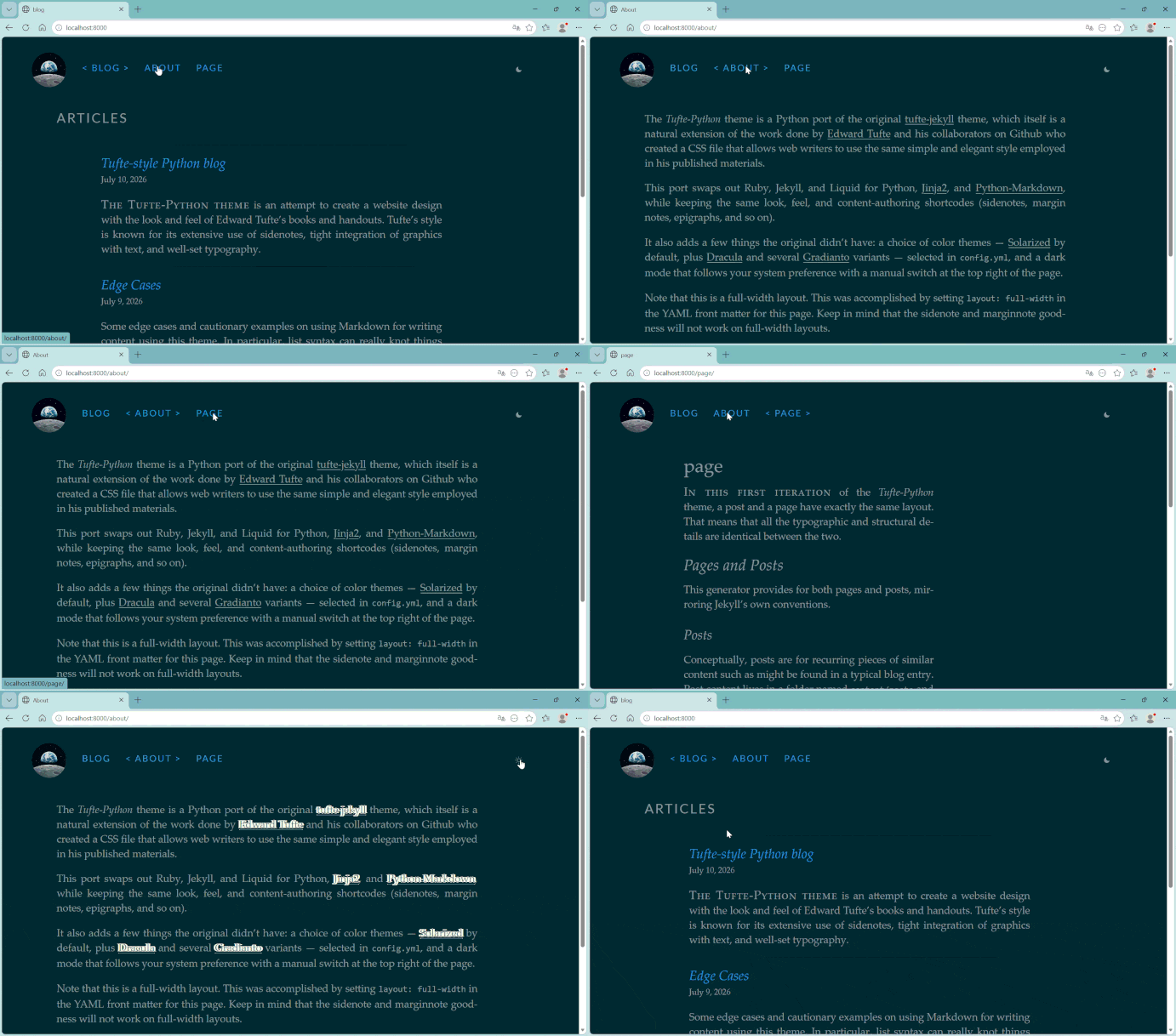
tufte-python 就是这次移植的成果,而这篇文章则充当一份指南:把基于 Liquid 的 Jekyll 主题迁移到 Python 上,究竟需要经历哪些步骤,以及我具体在哪些地方出过错,才最终把它做对。
这些经验并不是 Jekyll 专属的建议。无论你的目标是 Hugo(GoLang)、Eleventy(JavaScript),还是别的框架,套路都是相通的。
在这篇文章里,你会动手打磨一些非常具体的技术点,同时也能学到一种拆解问题的思路。如果你移植的是另一个主题,或者要迁移到一门完全不同的语言,请记住:语法会变,但挑战的形态始终不变。
目录
Step 5: Swap Filesystem-Watching for an Explicit Build Cache
Step 6: Replace Jekyll's Native GitHub Pages Build With Your Own CI
But Wait, Why a Static Blog?
Compared to dynamic websites, a static site has a simple publishing workflow. In this case, it consists of five steps:
Write a Markdown file.
Run the generator.
Preview and review the result.
Commit the source files.
Let GitHub Actions publish the site.
This workflow is simple enough for the needs I have: occasionally publishing posts on my personal Dev blog. It keeps the content readable in a text editor and makes every change easy to review.
与它的前身一样,实际代码库中保存着 Jinja2 模板、Markdown,以及供内容使用的 YAML 前置元数据(front matter)。站点由一条 GitHub Actions 工作流构建,生成的 _site/ 目录随后部署到 GitHub Pages。
为什么要移植主题,而不是直接拿来用?
之所以这样做,理由有好几个。
首先,也许你想摆脱一套在其他场合根本用不上的工具链。对我而言,那就是为了这一个目的才专门装在机器上的 Ruby。它实在不够稳定,以至于更新博客这件事,偶尔得先变成修好 Ruby 环境。
又或者,你日常本来就用目标语言写代码,那么与其为了(最终)能改一个插件文件而勉强学一点另一个生态系统的皮毛,不如直接阅读和扩展你早已得心应手的生成器。
也可能,你想要的不仅仅是用好一个静态站点生成器,而是真正理解它。移植会迫使你把每一个模板、每一个自定义标签、每一个构建步骤都读到足以重新实现的程度。这种学习和记忆信息的方式截然不同。与哦,能跑了!相比,这是完全不同层次的理解,也是通往精通的最佳途径之一。
你需要准备什么
基础的 Python 能力:会创建虚拟环境,能读懂别人的代码。
Git 和一个 GitHub 账号,因为两个版本的最终归宿都是 GitHub Pages。
对 Jekyll 的项目布局有基本了解:
_config.yml、_layouts/、_includes/,以及 Liquid 模板的语法。不需要事先掌握 Jinja2。它在概念上与 Liquid 相当接近,边做边学就能上手。
先看看终点:把移植完成的版本跑起来
在我细讲这次移植究竟是怎么完成的(包括其中出过错的部分)之前,不妨先看看最终的成品。我所描述的这个主题,已经作为一个可以直接交付使用的项目存在了。tufte-python 自带配套教程,只需几分钟,你就能让它在本地运行起来。
这样一来,你在阅读本文剩余内容时就有了一个具体的参照;如果更愿意在现成的移植版本上做改造,而不是从零开始搭建,也可以直接 fork 它。
初始设置
第一步,把项目 clone 下来,并将远程地址指向你自己的仓库(或者直接 fork 一份)
先在 GitHub 上新建一个空仓库,取个名字,比如 my-blog:
git clone https://github.com/hyperphantasia/tufte-python.git my-blog
cd my-blog
接下来,把 origin 远程地址改为指向你自己的仓库
git remote set-url origin
Then push the project:
git push -u origin main
Next, install the dependencies in a virtual environment
python -m venv .venv
# Uncomment to match your OS
# source .venv/bin/activate      # macOS/Linux
# .venv\Scripts\Activate.ps1     # Windows PowerShell
pip install -r requirements.txt
在首次构建之前,你需要先设置一些基本配置项。
打开项目根目录下的 config.yml:
title: "A Quiet Corner of the Web"
author: "Your Name"
email: "you@example.com"

url: "https://yourusername.github.io"
baseurl: "/my-blog"              # "" instead, if this is a user/org page
permalink: "/articles/{year}/{slug}/"

theme: "solAArized"
options:
  mathjax: true
如果你的博客发布在 https://yourusername.github.io/my-blog/,baseurl 就必须与仓库名完全一致:开头带斜杠,结尾不带。这一项一旦配错,部署上线的站点中所有内部链接和样式表引用都会 404,本地却一切正常(原因见下一条)。
最后,构建并预览:
python build.py --serve --watch

Open the address the terminal prints http://localhost:8000 (usually) and you should see the demo content that is already in content/. Leave --watch running and edit a post: the page rebuilds without you re-running anything.
One thing is worth knowing now before it costs you a confusing afternoon later: the local --serve preview ignores baseurl on purpose, so links and assets resolve from the root of your dev server instead of a subdirectory.
If you want to check the site exactly as it'll look once deployed, including the real baseurl: run python build.py --serve --production-urls instead. This is meant to preview the site using the production URL structure.
That distinction is the entire reason the works locally, breaks in production bug exists for static sites in subdirectories, and it's worth deliberately testing both modes at least once before you deploy for real.
Write your First Post
You can see the theme's features render on your own content instead of the demo's. Create content/posts/2024-06-07-hello.md:
---
title: "Hello, Margins"
date: 2024-06-07 14:30:00
categories: notes
tags: [smile, writing]
---

{% newthought 'A new thought' %} can open a section without another heading.

Here's a sidenote{% sidenote 'note-1' 'This appears in the right margin on wide screens, and behind a tap target on narrow ones.' %} to try the feature that made me want this theme in the first place.


Everything past the `` marker stays off the homepage excerpt but shows up on the full post.
还有许多其他视觉特性可以使用,我们会在下文的实现过程中详细介绍。
重新构建一下(或者交给 --watch 自动处理),你应该能看到:开头的短语变成了小型大写字母样式,页边还多出一条编号旁注,紧挨着引用它的那段文字。如果这两处都正常渲染,说明主题的核心机制在你的机器上已经完整跑通了,很好!本教程余下的内容,全都是围绕这个机制展开的。
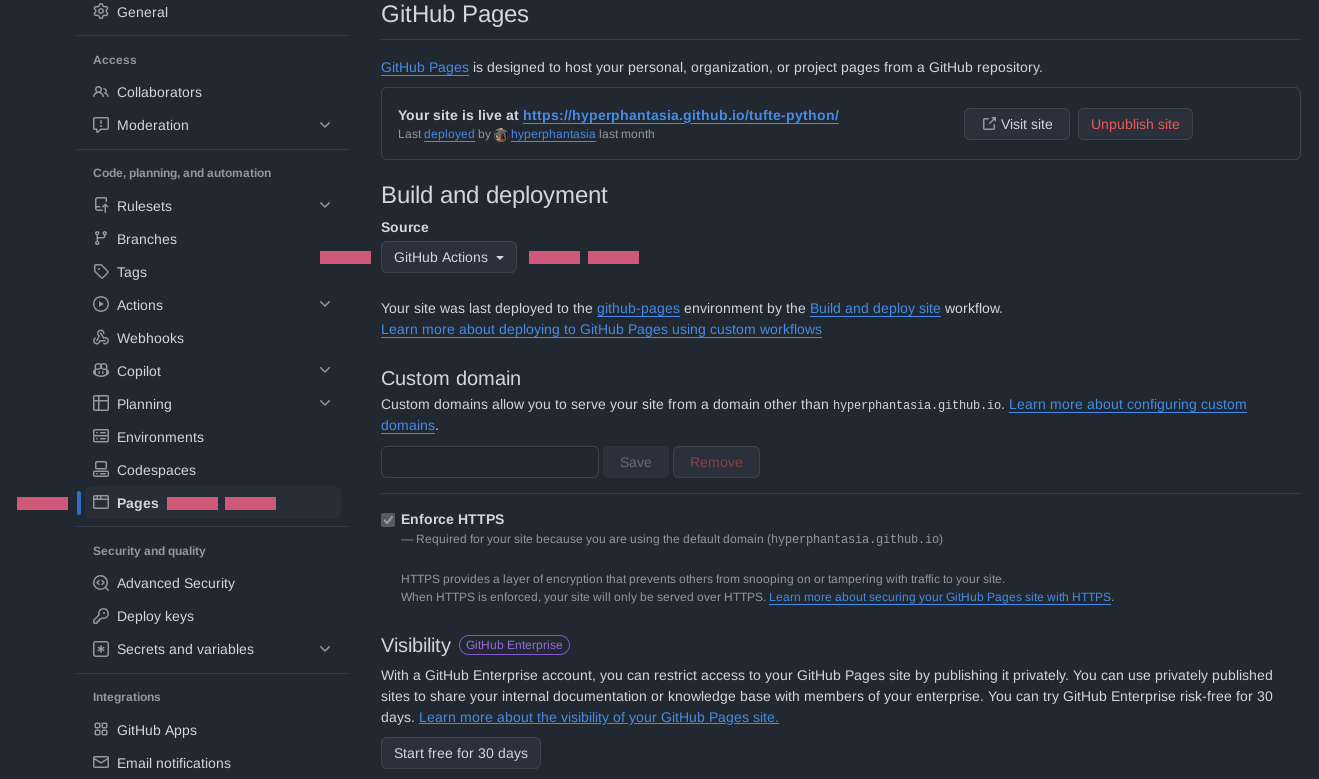
在仓库的 Settings → Pages 页面中,如果来源还不是 GitHub Actions,就把它设成 GitHub Actions。项目自带的 workflow 会在每次向 main 推送代码时自动完成构建和部署。第 6 步我会详细讲讲这个 workflow 究竟在做什么——毕竟 GitHub Pages 不知道该怎么处理 Python 构建脚本。
本地效果满意后,就可以发布了:
git add config.yml content/
git commit -m "Configure site and add first post"
git push
让它跑起来之后,你手上就有了一个可以在线访问的参照版本。下面来讲讲这一切是怎么搭出来的。
从 tufte-jekyll 到 tufte-python:一步步迁移
要把一个 Jekyll 主题迁移到 Python 构建系统,关键是按照有条理的步骤逐步拆解现有配置。
这里我划分了六个高层步骤,具体几步则因任务而异。很重要的一点是:先在脑海里把最终结果“想透”。这样才能在过程中尽量不断档的前提下,完成配置整合与工具链现代化。
第 1 步:盘点源主题的各个运作部件
在动手写任何 Python 之前,我先逐一列出了主题实际依赖的各个 Jekyll 组件。对这个重度依赖 Liquid 的主题来说,它们可以分成四类:
| Jekyll 组件 | 作用 | 对应的 Python 方案 |
|---|---|---|
_config.yml + _data/*.yml |
站点元数据、基础 URL、永久链接格式、功能开关,以及社交链接等结构化数据 | 一个 config.yml |
_layouts/ + _includes/ |
页面模板和局部模板 | 一个由 Jinja2 模板组成的 templates/ 目录 |
_plugins/*.rb |
注册主题自定义 Liquid 标签的 Ruby 类 | 一个小型 Python 模块,负责展开相同的标签语法 |
_sass/*.scss |
构建时编译为单一样式表的 Sass 分片文件 | 纯 CSS 文件,无需编译步骤 |
首次盘点时,我漏掉了第五类:原主题自带两个彼此独立的 Rake 任务——一个用于生成新文章和新页面的脚手架,另一个则完全是另一回事:UploadToGithub.Rakefile,用来手动把构建好的站点推送到 gh-pages 分支。
之所以需要它,是因为主题的插件并不在 Jekyll Pages 的安全白名单里。我当时只读了主 Rakefile,自以为已经摸清了完整的部署流程,结果之后好一阵子都在纳闷:原作者究竟是怎么把站点发布上线的?
一条忠告:在敲定目录结构之前,把仓库根目录完整读一遍,别只盯着那些名字一眼就能看懂的文件。
第 2 步:把分散的配置合并进一个文件
Jekyll 版本把配置分散在 _config.yml(站点标题、URL、baseurl、永久链接格式)和 _data/ 目录下的一个或多个文件里:一个文件放着 MathJax 和字体加载的开关,另一个文件放着社交链接列表。这种拆分方式沿袭了 Jekyll 自身的数据文件约定,但如果 loader 是你自己写的(而且刻意保持精简),就没必要背上这份复杂度。
我把这些配置全部收拢到一个文件里,并用命名清晰的分节来组织。这样以后任何人想扩展这个主题,只需在一处就能看到所有设置,而不必在三个文件之间来回翻找。最终得到的大致如下:
# config.yml
# --- site metadata ---
title: "A Quiet Corner of the Web"
author: "Your Name"
email: "you@example.com"

# --- URL settings ---
url: "https://yourusername.github.io"
baseurl: "/my-blog"
permalink: "/articles/{year}/{slug}/"

# --- feature toggles (previously in _data/options.yml) ---
mathjax: true
justify_text: false

# --- social links (previously in _data/social.yml) ---
social:
  - link: "github.com/yourusername"
    icon: icon-github
Step 3: Rebuild Custom Liquid Tags as Text Shortcodes
This is the part that took the longest to tinker with. It's also where most of the theme's actual personality lives. This is where you actually build the visual features: sidenotes, margin figures, and epigraphs.
How Jekyll does it
Custom Liquid tags live in _plugins/, as Ruby classes Jekyll registers with its Liquid parser. Jekyll expands them during its Liquid render pass, before handing the result to its Markdown engine.
A tag like {% sidenote "note-1" "Some aside." %} never reaches the Markdown converter as-is. It's already been swapped for HTML by the time Markdown sees the page.
Why you can't just port this 1:1 into Jinja2.
Jinja2 has its own tag system, but it's built for template-authoring logic (with loops, conditionals, and so on) not for parsing arbitrary quoted arguments out of prose sitting inside a Markdown file. And even if I'd built a Jinja2 extension for it, every existing post using the old {% sidenote ... %} syntax would need rewriting. This catch defeats the entire point of a drop-in port.
What Actually Works
Treat the tag syntax as plain text, and expand it with a preprocessing pass over the raw Markdown, before handing it to the Markdown renderer. The strategy is to mirror Jekyll's own tag-then-Markdown order exactly. A simplified version of that pass looks like this:
import re, shlex
TAG_RE = re.compile(r"\{%\s*(\w+)\s*(.*?)\s*%\}")
def split_args(raw: str) -> list[str]:
lexer = shlex.shlex(raw, posix=True)
lexer.whitespace_split = True
return list(lexer)
def render_sidenote(args, resolve_img, render_md):
note_id, text = args[0], args[1]
text = render_md(text)
return (f"{text}")
HANDLERS = {"sidenote": render_sidenote} # All visual features are registered here
def expand_shortcodes(text: str, resolve_img, render_md) -> str:
def dispatch(match: re.Match) -> str:
name, raw_args = match.group(1), match.group(2)
handler = HANDLERS.get(name)
if handler is None:
return match.group(0) # leave unknown tags untouched
return handler(split_args(raw_args), resolve_img, render_md)
return TAG_RE.sub(dispatch, text)
The snippet above acts as a custom "search-and-replace" engine that converts shorthand tags into HTML before the final page is rendered. It uses a regular expression to scan the text for patterns like {% tag arguments %}.
The Regex (TAG_RE) is the "Scanner":
The regex is responsible for finding the tags in the big block of text. It breaks every match into two specific groups:
Group 1 (the name): the word immediately after {% (for example, "sidenote").
Group 2 (the raw arguments): everything else until the closing %} (for example, "note-1" "Some aside.").
expand_shortcodes is the "Coordinator":
This function manages the overall process. It uses re.sub to loop through the text. Every time the regex finds a match, expand_shortcodes triggers the dispatch function, which does two things:
It uses the name from Group 1 to look up the correct logic in the
HANDLERSdictionary.It passes the raw arguments from Group 2 into
split_argsbefore sending them to the parser.
split_args is the "Parser":
split_args uses the shlex library to "smart-split" the string. It recognizes quotes, so that anything inside quotation marks is kept together as a single argument. This produces a clean list where Arguments containing spaces, like a sentence inside quotes are treated as a single piece of data rather than multiple separate words (for example, ['note-1', 'Some aside.']). The final handler function can easily process that.
Render:
The last step is the actual rendering. Each tag name identified in the HANDLERS dictionary is tied to a specific Python function that knows how to return the corresponding HTML markup (for example, render_sidenote() for sidenotes).
You can have a look at the .sidenote and .margin-toggle CSS classes, to grasp an idea of how they behave visually.
Two bugs taught me why the details above matter. Both were found by throwing real old posts at the new build instead of just the demo content:
Quoting broke first. My first argument splitter was
raw.split()on whitespace. It worked fine until I fed it a post with an apostrophe in a sidenote.Example: "reader's" is problematic. It split into two arguments and shift every argument after it by one. Liquid's own tag documentation actually spells out the fix: accept either single or double quotes, and allow a backslash to escape a quote inside the text.
shlexin POSIX mode does exactly that in about two lines, which is a smaller fix than the bug deserved.Code fences broke second. I wrote a post explaining the shortcode syntax itself, with an example wrapped in a fenced code block. This is a case of context-blindness. The regular expression is designed to find the pattern
{% ... %}anywhere it appears in the document, but it doesn't know the difference between "live" code that should be executed and "example" code that is just meant to be displayed as-is to the reader.The expand_shortcodesfunction sees the{% and %}inside that code block and says, "Aha! A visual feature!" It then replaces the example text with the actual HTML for a sidenote and you end up seeing a broken layout where a functional feature is floating inside a code block.The fix is to stash fenced and inline code spans behind placeholders (like
##CODEBLOCK_1##) before running the tag regex, then restore them afterward.
The Rendered Features
The margin is not decoration. The Tufte-inspired layout remains readable thanks to the restrained typography and a generous margin set for supporting materials.
Secondary information moves into the margin instead of becoming a long interruption in the body of the article. It gives other visual elements such as notes, references, and figures a unique place to live without interrupting the main argument.
From there, porting the rest of the tags was repetitive and mechanical: same pattern, a different handler and argument count each time, the entire code is available in this file and this is how they render:
New Thought:

- Liquid tag:
{% newthought 'text' %}
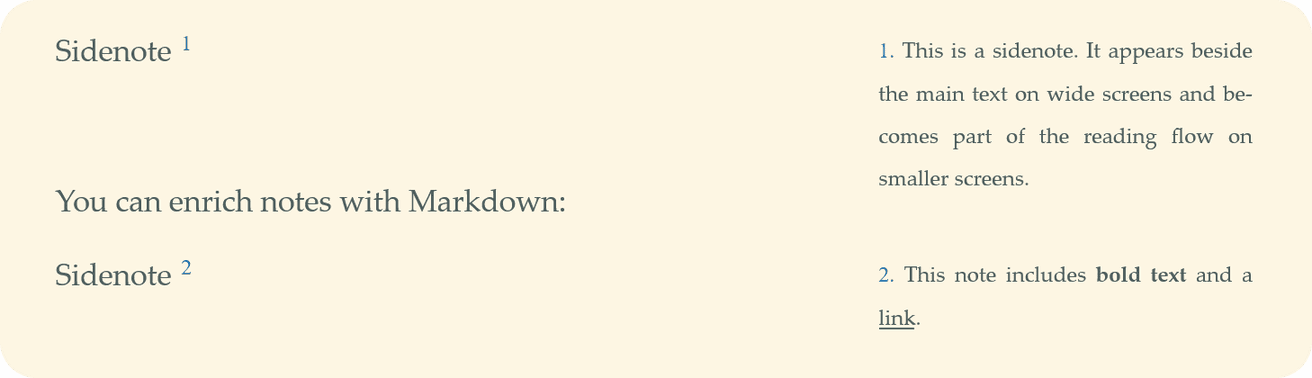
Sidenote:
Liquid tag:
{% sidenote 'id' 'text' %}Sidenotes are numbered aside in the right margin.
旁注:

Liquid 标签:
{% marginnote 'id' 'text' %}旁注是排在页边空白处、不带编号的补充说明。
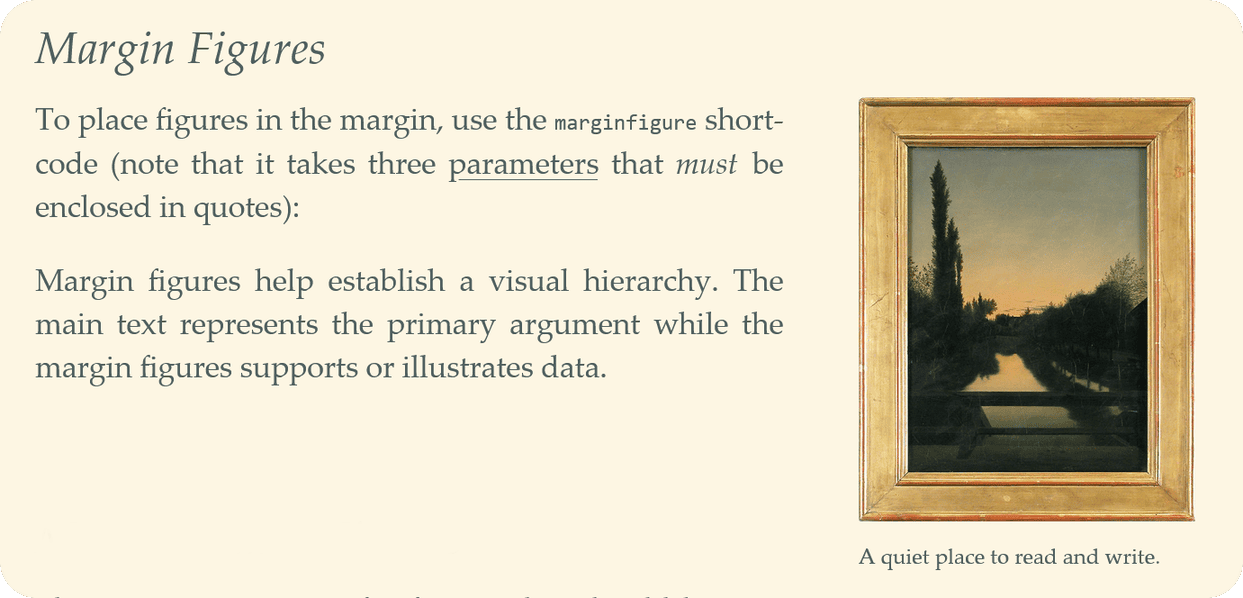
边栏图片:
Liquid 标签:
{% marginfigure 'id' 'path' 'caption' %}配图会被限制在边栏这一列中。处理图片本身并不是什么难事,HTML 本身就提供了
img标签;难的是让图片在视口中准确就位,不过原版 SCSS 已经把这个问题处理得很好了。
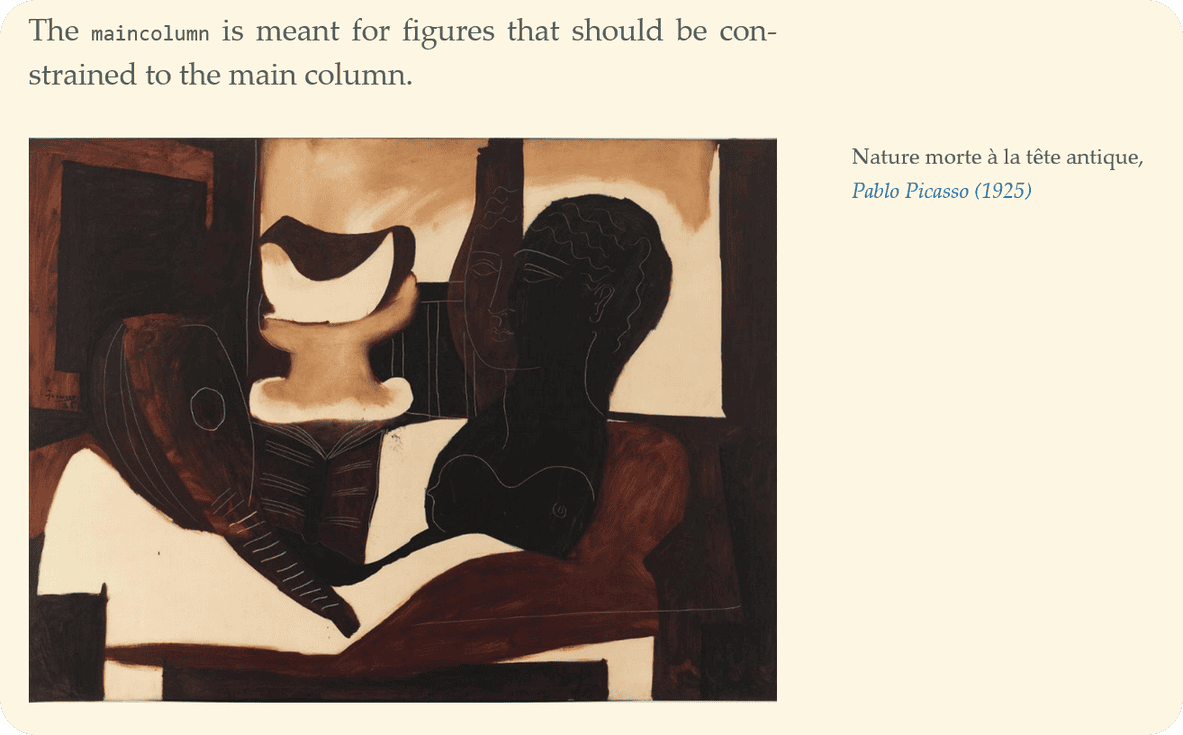
主栏图片:
Liquid 标签:
{% maincolumn 'path' 'caption' %}主图只出现在正文一栏中。
通栏图片:

Liquid 标签:
{% fullwidth 'path' 'caption' %}图片横跨两栏展示。
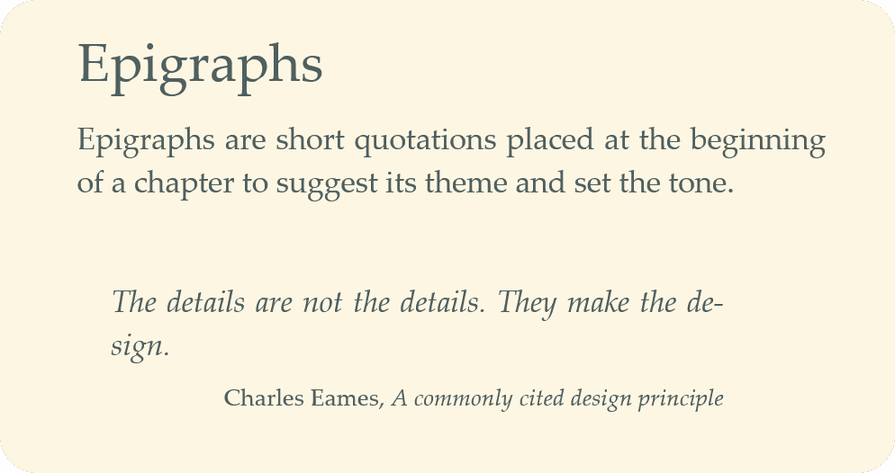
题记:
Liquid 标签:
{% epigraph 'quote' 'author' 'source' %}适用于单独成段、注明作者与出处的引文。
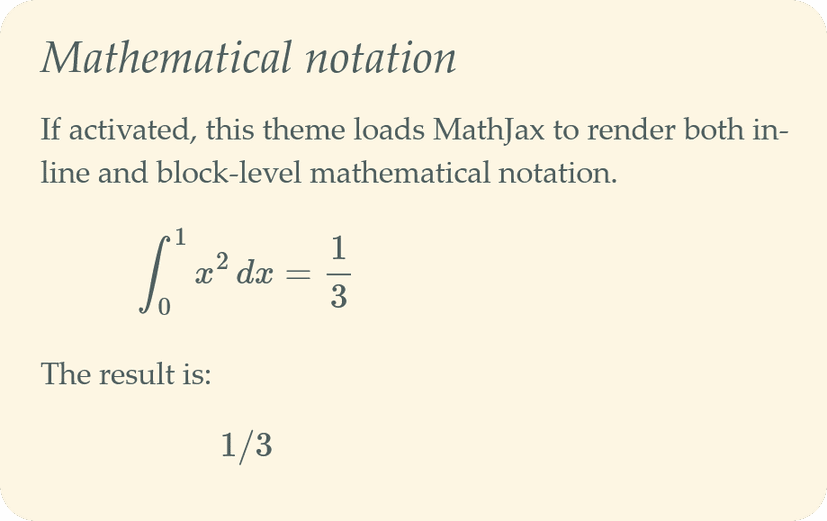
数学公式:
你还可以使用标准的 Markdown 功能,比如代码片段:

或者表格:
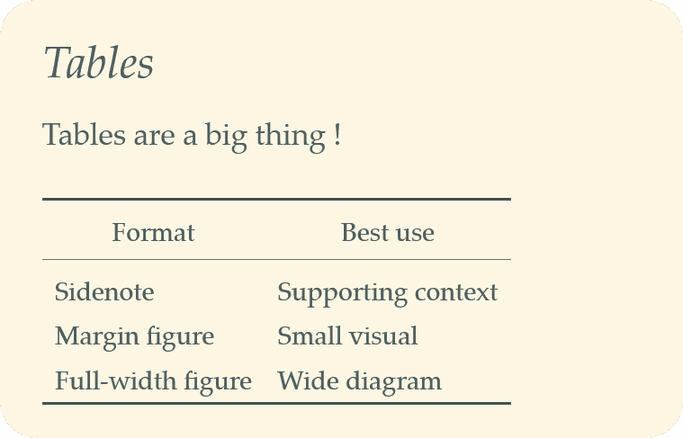
后面这两个元素的实现要简单得多。既然它们完全由纯 Markdown 渲染,只需直接在 CSS 样式表里处理即可(例如 tufte.css 文件中的表格样式部分)。
第 4 步:用可替换的纯 CSS 取代编译后的 Sass
Jekyll 的 Sass 流水线会在构建时把 _sass/ 目录下的各个局部文件编译成一个样式表,从而将一套固定的配色方案固化到输出结果中。
移植一个主题而已,我不想为此背上 Sass 编译的依赖,于是干脆不再把颜色编译进 CSS。
纯 CSS 样式表分为两层:一层是结构 CSS,绝不硬编码任何颜色,只引用 color: var(--color-text) 这类自定义属性;另一层是每种配色方案各对应一个的小型主题文件,其中除了 --color-* 属性之外什么也不定义。构建时,程序会根据 config.yml 中的 theme: 键,仅将所选主题的文件复制到输出结果里。
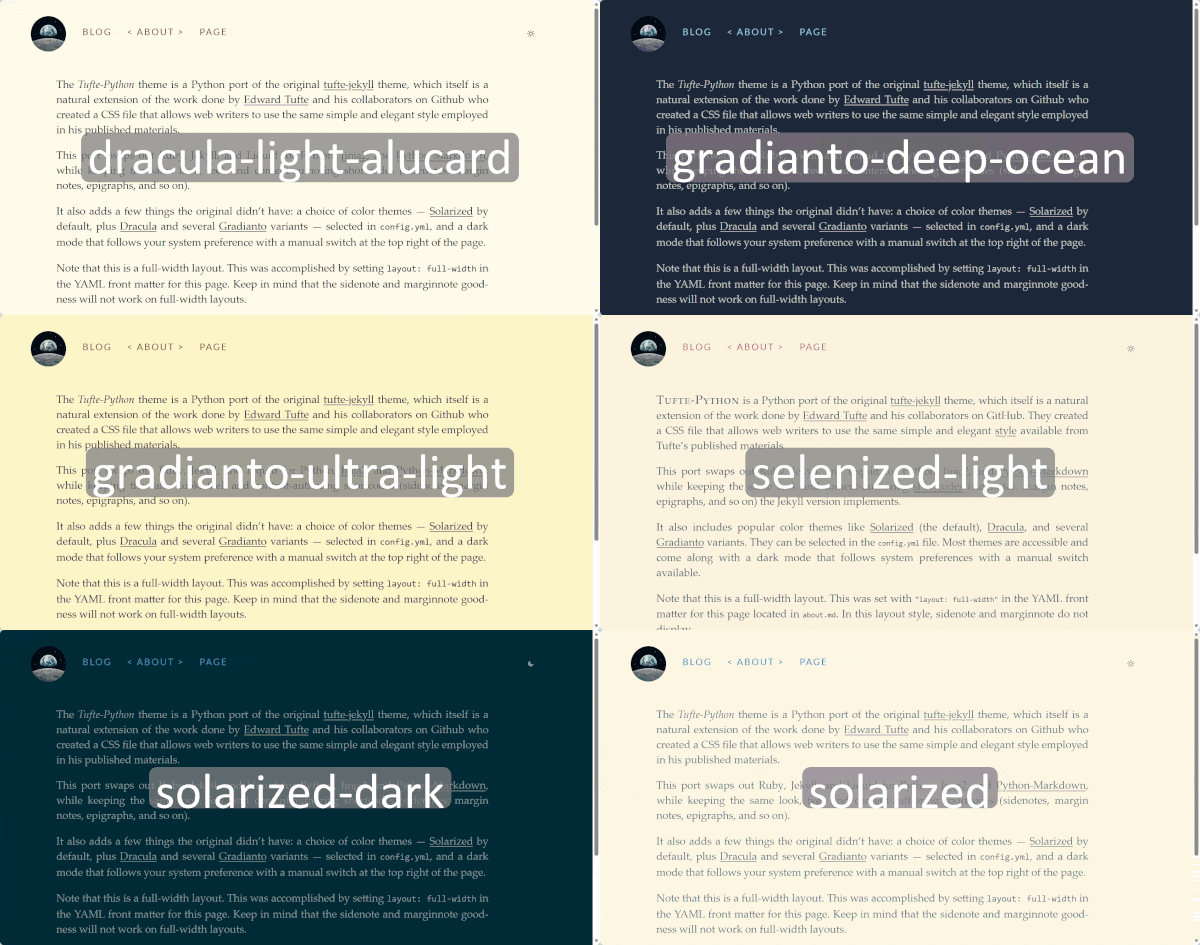
自定义主题是我早就想实现的一项重大改进。等我真正核对过数据,这件事就不再只是权宜之计了。我最初默认采用 Solarized,纯粹是因为喜欢;后来才发现,它算不上最优,至少在无障碍方面是如此。这一点早有文档记载:Solarized 以牺牲部分对比度为代价,换取了更低的视觉疲劳。
别人说不定真会用它来阅读,不加任何提示就把这套配色作为默认发布出去,我觉得并不妥当。
主题系统本来就是一组可随时替换的 CSS 文件,所以修复办法只是再多加一个文件:在保留原有版本的同时,新增一个满足 WCAG 2.0 AA 无障碍标准的变体——沿用同一套调色板,但把对比度调整到稳稳超过 4.5:1。本教程配置示例所指向的正是这个选项:solAArized。
没过多久,自定义属性方案就再次显出了价值:颜色由浏览器在运行时解析,而不是在构建阶段写死,因此要添加一个由 prefers-color-scheme 驱动的明暗模式切换,只需再包一层很小的 JS 文件。如果调色板是靠 Sass 编译出来的单一版本,不重新编译两遍根本做不到这一点。
第 5 步:用显式的构建缓存取代文件系统监听
jekyll serve -w 把文件监听和增量重新生成捆绑在了一起。而增量构建,就免不了要追踪文件的真实状态。
我的第一版缓存只记录每篇文章自身的修改时间:文件没变,就跳过重新渲染。这套逻辑一直没问题——直到你去改某个共享模板。我修改了文章布局模板,重新构建后,结果只有两篇文章应用了改动:恰好是我当天也碰过的那两篇。其余文章按缓存唯一掌握的判断标准都算“未变更”,于是 _site/ 里保留的仍是编辑前的旧 HTML。
解决办法是引入第二个独立的时间戳,它不与任何单个文档绑定:追踪所有全局构建输入中最新的修改时间,包括模板、config.yml 以及生成器自身的源码。只要其中任何一项比缓存记录的更晚,就强制完整重建,不管每篇文章自身的时间戳怎么说。
import json
from pathlib import Path

CACHE_FILE = Path(".build_cache.json")

def load_cache() -> dict:
    if not CACHE_FILE.exists():
        return {"global_mtime": 0.0, "docs": {}}
    return json.loads(CACHE_FILE.read_text())

def needs_rebuild(src: Path, out: Path, cache: dict, global_stale: bool) -> bool:
    if global_stale or not out.exists():
        return True
    cached_mtime = cache["docs"].get(str(src))
    return cached_mtime is None or src.stat().st_mtime > cached_mtime

def save_cache(cache: dict, docs: dict) -> None:
    cache["docs"] = docs
    CACHE_FILE.write_text(json.dumps(cache))
load_cache() 函数读取一个已保存的 JSON 文件,其中记录了每个文档的最后修改时间;如果该文件尚不存在,就创建一个全新的空缓存。
needs_rebuild() 函数用来判断某个源文件是否真的需要重新构建:它会比较文件当前的修改时间和缓存中记录的时间戳。如果文件比缓存里的记录更新,或者输出文件不存在,就返回 True(表示“需要重建”)。
最后,save_cache() 会用新的构建信息更新缓存并写回 JSON 文件。这样下次运行构建时,没有改动的文件就可以直接跳过。
想知道一个共享模板实际牵连到哪些页面,除了把所有内容重新解析一遍,没有更省事的办法,所以我不再在这上面耍小聪明。代价是模板每次改动后要经历一次较慢的构建,但换来的是:永远不会在不知不觉中发布一个看似构建成功、实际却没有应用改动的页面。
第 6 步:用自己的 CI 替换 Jekyll 在 GitHub Pages 上的原生构建
GitHub Pages 原生就懂得如何构建 Jekyll,但它完全不知道 python build.py 是什么意思。因此迁移后的项目需要有自己的 CI 步骤来构建站点,并把产物交给 Pages:
# .github/workflows/deploy.yml
name: Build and deploy site
on:
  push:
    branches: [main]

jobs:
  build:
    runs-on: ubuntu-latest
    steps:
      - uses: actions/checkout@v4
      - uses: actions/setup-python@v5
        with:
          python-version: "3.12"
      - run: pip install -r requirements.txt
      - run: python build.py
      - uses: actions/upload-pages-artifact@v3
        with:
          path: _site

  deploy:
    needs: build
    runs-on: ubuntu-latest
    permissions:
      pages: write
      id-token: write
    steps:
      - uses: actions/deploy-pages@v4
具体会发生什么?当你推送代码时,GitHub 服务器会自动运行 build 任务:检出你的代码、安装 Python 3.12、下载项目依赖(来自 requirements.txt)、运行 build.py 生成网站,最后把生成的 _site 文件夹作为构建产物上传。
构建成功后,deploy 任务随即自动运行,取回这份构建产物并发布到 GitHub Pages 上线。请注意 needs: build 这一行:它保证了 deploy 步骤只有在 build 成功完成后才会执行,因此你不会误将有问题的构建部署上线。
本文前文的快速入门所依赖的正是这套工作流。切记:在 Settings → Pages 中,来源必须设置为 GitHub Actions,而不是某个分支(这会彻底取代 Jekyll 内置的构建步骤)。我第一次就漏掉了这项设置,花了好几分钟一直以为工作流悄悄失败了,实际上它早已成功运行,只是没有配置好部署目标而已。
第 7 步:验证功能对等,而不只是“能构建”
编译顺利通过的移植,未必就是正确的移植。上文提到的每一个 bug,一开始都通过了干净的构建。在宣布大功告成之前,我对照以下内容做了测试:
原主题中真实、未做改动的文章,而不只是演示内容。正是这样才真正揪出了引号 bug 和代码块 bug——在我停止用自己特意写得简单的内容做测试之前,这两个问题始终没有暴露。
刻意测试引号的边界情况:笔记里的撇号、笔记里的 Markdown 格式、转义的双引号。
响应式行为:旁注和边注在窄屏上需要点击展开,这类交互在桌面端很容易做对,到了移动端却可能悄无声息地失灵。
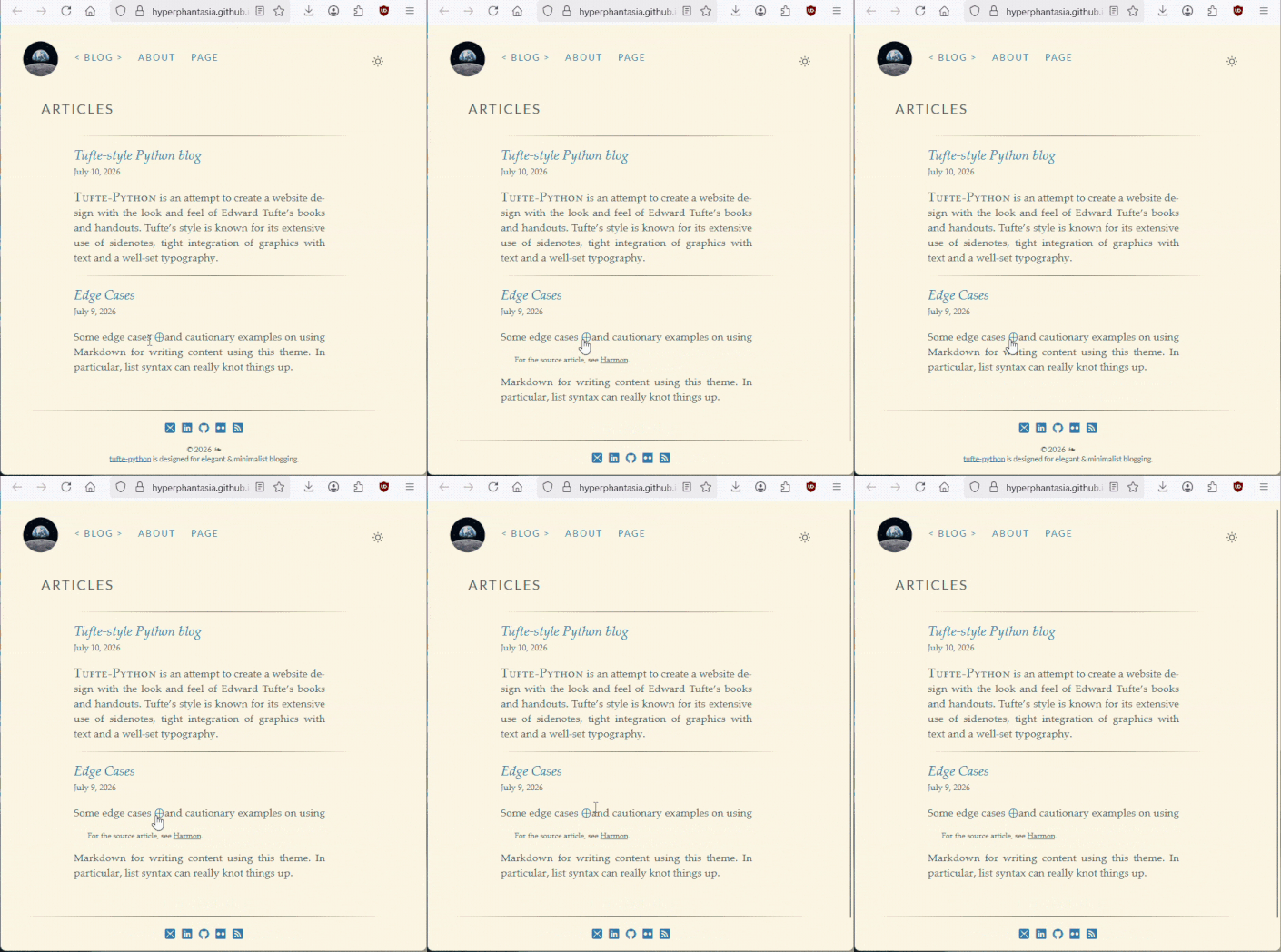
响应式设计时常被忽视,但面对如今五花八门的设备,它绝不是可有可无的选项。请始终把它当作一种完整而独立的用户体验来对待。
如果一切重来,我会对自己说的话
这次移植中每一个真正的 bug,根源都是同一个:我用自己特意写得简单的内容来测试,而不是拿已有的真实内容。
别对旧标签“应该”如何表现抱有先入为主的看法。每一次修复,靠的都是同一个直觉:去旧仓库的文档和代码里找出真实的边界情况,而不是凭空猜测“大概”需要支持什么。
这些步骤本身并不局限于这一个主题,而是可以推广到各种迁移场景:梳理源生成器的各个组成部分,归并它的配置;把自定义标签重新实现为一个文本预处理环节,而不是跟新模板引擎的语法较劲;把编译式样式换成新栈无需额外工具就能产出的方案;自己写一个增量缓存,并为全局变更预留一条明确的逃生通道;用自己的 CI 取代即将舍弃的原生部署步骤;最后,用真实内容而非干净构建来做验证。无论你是从 Jekyll 迁到 Python、从 Python 迁到 Go,还是迁往其他任何地方,这套思路都成立。
感谢阅读!欢迎为 tufte-python 贡献代码!我很期待看到你能想出什么点子,让这个库变得更好。更多个人项目可以在我的 GitHub 和 Kaggle 上找到,也欢迎直接在 LinkedIn 上与我联系。